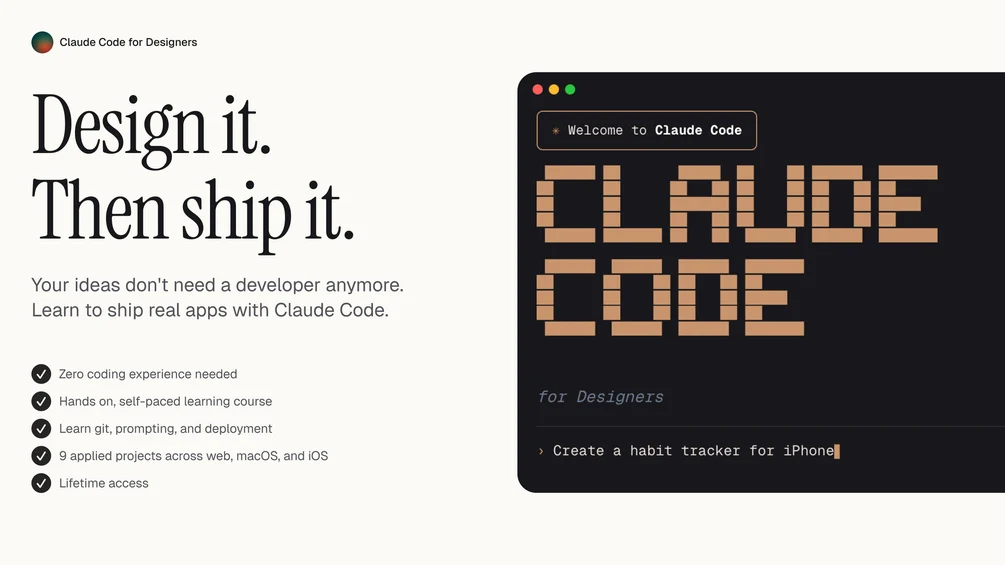
Claude Code for Designers – 2026 Course
$49.99 Original price was: $49.99.$22.00Current price is: $22.00.

Claude Code for Designers – 2026 Course
The design industry is evolving faster than ever. Artificial intelligence is no longer a futuristic concept—it is now a core part of modern creative workflows. From UI/UX to branding systems, designers are integrating AI into their daily tasks to improve speed, creativity, and precision. The Claude Code for Designers – 2026 Course is built specifically for designers who want to stay ahead, work smarter, and master AI-assisted development without becoming full-time programmers.
This comprehensive course bridges the gap between design thinking and intelligent code generation. Whether you are a UI/UX designer, product designer, Webflow expert, or digital creator, this program gives you the skills to confidently use Claude AI for real-world creative production.
Why Designers Must Learn AI-Assisted Coding in 2026
Artificial intelligence is transforming how digital products are built. Designers are no longer limited to static mockups. Instead, they are expected to prototype, test, automate, and even ship functional components.
Here’s why learning AI-assisted coding matters:
Faster prototyping and iteration
Reduced dependency on developers for small tasks
Automated documentation and content generation
Smarter UX testing workflows
Scalable design systems powered by AI logic
The Claude Code for Designers – 2026 Course focuses on practical implementation. Instead of overwhelming you with theory, it teaches how to apply Claude AI directly inside your creative workflow.
What Makes This Course Unique?
Most AI coding courses are designed for software engineers. They focus heavily on algorithms, backend systems, and technical complexity. Designers need something different. They need clarity, usability, and creative control.
This course is different because it:
Explains coding concepts in design language
Focuses on real creative use cases
Includes UI/UX-based examples
Demonstrates automation inside Figma, Webflow, and frontend environments
Shows how to write prompts that generate usable production code
The goal of the Claude Code for Designers – 2026 Course is not to turn you into a software engineer. Instead, it empowers you to become an AI-augmented designer who understands how to generate, modify, and implement code effectively.
Course Overview
1. Foundations of AI-Assisted Design
You begin by understanding how Claude AI works in a creative context. This includes:
How large language models generate code
Understanding structured prompts
Breaking down design problems into logical instructions
Controlling output quality
This foundation ensures you don’t just copy AI outputs—you understand and refine them.
2. Prompt Engineering for Designers
Prompt engineering is one of the most important skills you’ll develop. You’ll learn:
How to structure design-focused prompts
Writing UI component instructions
Generating HTML, CSS, and JavaScript efficiently
Refining outputs for responsive design
Debugging AI-generated layouts
Instead of guessing what to type, you’ll follow frameworks that consistently produce professional results.
3. Creating Functional UI Components
Designers often struggle when converting mockups into working components. This course shows you how to:
Convert Figma designs into responsive HTML/CSS
Generate interactive buttons and forms
Build modals and navigation systems
Create dynamic sections using JavaScript
Optimize layout for mobile devices
With AI assistance, these tasks become significantly faster and more manageable.
4. Automating Repetitive Design Tasks
One of the biggest benefits of AI is automation. In this module, you’ll learn how to:
Generate reusable code blocks
Create template-based landing pages
Build structured content sections
Produce consistent design systems
Automate microcopy and UX text
The Claude Code for Designers – 2026 Course emphasizes workflow efficiency so you can focus on creativity instead of repetition.
5. AI-Powered Prototyping
Modern clients expect interactive prototypes. Static screens are no longer enough.
In this section, you will learn how to:
Generate interactive prototypes using lightweight code
Create animated UI interactions
Simulate real user flows
Test UX scenarios quickly
Present live demos to clients
This dramatically improves how you pitch and validate ideas.
6. Real-World Projects
The best way to learn is by building. The course includes multiple real-world projects such as:
Portfolio website generation
SaaS landing page creation
E-commerce product page design
Dashboard UI components
Automated content layouts
By the end of the program, you’ll have practical examples you can showcase in your portfolio.
Who Is This Course For?
The Claude Code for Designers – 2026 Course is ideal for:
UI/UX Designers
Web Designers
Webflow Developers
Product Designers
Creative Directors
Freelancers
Digital Agency Owners
Even if you have zero coding experience, the step-by-step lessons make complex concepts easy to understand.
Skills You Will Master
After completing the course, you will be able to:
Write structured prompts for reliable code generation
Edit and optimize AI-generated frontend code
Build responsive websites without heavy coding
Automate design systems efficiently
Debug simple layout and styling issues
Create interactive prototypes for client presentations
Integrate AI into daily design workflows
These skills will significantly increase your productivity and value in the market.
How This Course Improves Your Career
In 2026, designers who understand AI workflows will dominate the job market. Companies are actively looking for hybrid professionals who combine creativity with technical understanding.
Benefits include:
Higher freelance rates
Faster project turnaround
Improved client communication
Increased independence
Competitive advantage in hiring
Mastering AI-assisted coding gives you leverage in negotiations and project execution.
Step-by-Step Learning Structure
The course is organized in a logical progression:
Understanding AI fundamentals
Learning structured prompting
Generating simple layouts
Creating responsive components
Adding interactivity
Automating workflows
Building complete projects
Each module builds on the previous one, ensuring you never feel overwhelmed.
Tools Covered in the Course
While the main focus is Claude AI, you will also explore:
HTML & CSS fundamentals
Basic JavaScript logic
Responsive design principles
Design-to-code workflows
UI component structuring
Everything is explained from a designer’s perspective, not a developer’s.
Practical Workflow Example
Imagine you design a SaaS landing page in Figma. Normally, you would:
Export assets
Wait for a developer
Revise code repeatedly
Fix responsiveness issues
With the Claude Code for Designers – 2026 Course, you learn how to:
Provide structured prompts
Generate clean frontend code
Adjust styling instantly
Improve responsiveness
Deploy faster
This reduces back-and-forth communication and speeds up project delivery.
Advanced Optimization Techniques
Beyond basic generation, you’ll also explore:
Code refactoring
Accessibility improvements
Performance optimization
Semantic HTML structure
Clean CSS architecture
These techniques ensure your output is not just functional but professional.
Future-Proof Your Design Career
AI is not replacing designers. It is replacing slow workflows. The designers who adapt will lead.
By learning how to collaborate with AI tools, you unlock:
Creative experimentation
Rapid testing
Faster iteration cycles
Smarter automation
Enhanced productivity
The Claude Code for Designers – 2026 Course prepares you for the next wave of digital design evolution.
Frequently Asked Questions
Do I need coding experience?
No. The course is beginner-friendly and structured specifically for designers.
Is this only for web designers?
While web designers benefit most, product designers and UI specialists can also apply these skills.
Will AI replace developers?
No. Instead, it improves collaboration and reduces repetitive work.
How long does it take to complete?
Depending on your pace, most learners complete it within a few weeks.
Final Thoughts
Design is no longer limited to visual aesthetics. The future belongs to creators who can think visually and execute technically. Learning AI-assisted workflows is no longer optional—it is essential.
The Claude Code for Designers – 2026 Course gives you a structured path to mastering AI-driven coding without overwhelming complexity. It empowers you to transform static designs into functional digital experiences efficiently and confidently.
If you want to stay competitive, increase productivity, and unlock new creative possibilities, now is the time to integrate AI into your workflow. This course is your gateway to becoming a next-generation designer who understands both design and intelligent automation.